


Amazon Music: Songs & Podcasts
3.9496.15K Reviews
App Specs
- Version
- Varies with Device
- Updated On
- License
- Free
- Downloads
- 100,000,000+
- Developer
- Amazon Mobile LLC
- Categories
- Music & Audio
- Platform
- Android, iOS
Screenshots
 Analysis by AppCompare
I use audio apps most when I need something to accompany an ordinary task, not when I’m trying to build a perfect listening setup. Amazon Music: Songs & Podcasts brings music and spoken shows into one place, which makes it handy when I want to switch from a playlist to an episode without changing apps. It is an entertainment and listening tool rather than a creative-production workspace, so I judge it by how easily it helps me find something suitable and keep listening through the day.
Finding a useful starting point
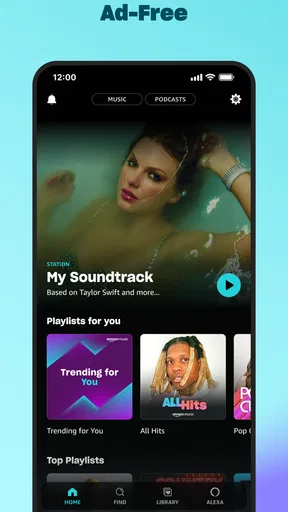
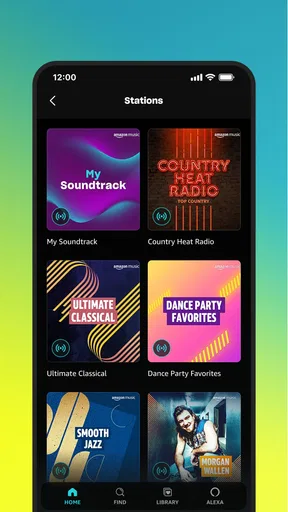
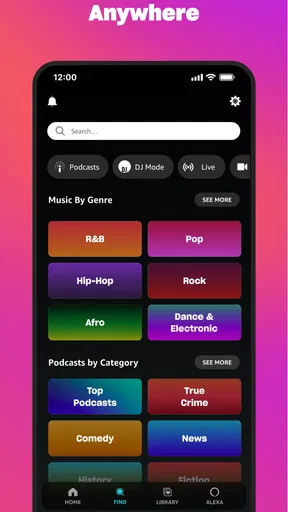
When I first downloaded Amazon Music: Songs & Podcasts, I was curious about how it would stand out in a sea of streaming apps. The first thing that caught my attention was the sleek interface. Everything is neatly organized, and finding my way around was a breeze. You can swiftly jump from your favorite tunes to engaging podcasts without breaking a sweat.
That simple switch between formats is most useful when my plans change. I might start with music while getting ready, then choose a talk show for a quieter stretch of the day. Having both types of listening close together cuts down on app-hopping, though it does not turn the service into a tool for recording, editing, or publishing audio. If your goal is to make a podcast or assemble tracks for delivery, you will need a separate production app.
Guides and Analysis on Amazon Music: Songs & Podcasts
The app is free to download, and it is made by Amazon Mobile LLC. It has a 3.7 average from around 3.3 million ratings, with more than 100 million installs. Those figures suggest a widely used service, but they are not a promise that its recommendations or catalog will suit every listener. It is rated Teen, and in-app purchases are listed at $11.99 per item, so I would check the current offer and what it includes before committing to a paid option.
Choosing what to listen to
The app’s recommendation feature is pretty spot on. It’s like it knows me better than I know myself! I was introduced to new artists and podcast hosts that I might have never stumbled upon otherwise. The playlists are curated to fit every mood, whether you're looking to chill, work out, or just vibe out on a long drive.
I get the most from recommendations when I treat them as a starting point rather than a final answer. If I am in the mood for a particular energy, a suggested playlist can get me listening quickly; if I want a very specific artist, album, or sequence, searching and choosing directly gives me more control. That distinction matters for focused listening: discovery is convenient, while deliberate selection is better when I do not want the app to steer the session.
A practical routine is to use a playlist for a task with a clear endpoint, such as cooking dinner or tidying a room, and then switch to a podcast when I can pay closer attention. The music can fill the gaps without demanding much thought; a spoken episode is a better fit for a walk or commute where I can follow a longer thread. I would avoid relying on either format to manage a work project itself: the app supplies listening material, not project notes, editing tools, or a handoff process.
Worth Reading Before You Choose

Ludo King Makes the Most of the Minutes Between Plans

Baby Panda World Brings Quick Play to Modern Phones, but Its Game Library Feels Busy

ESPN’s Live Game View Makes Following Close Games Easier

QuizzLand Review: A Good Fit for Short Trivia Breaks, Not Every Player

Basketball Stars: Multiplayer Is Fast, but Can It Recover When Matches Go Wrong?

WEBTOON Turns Phone Updates Into a Better Reading Routine
Making podcasts fit the day
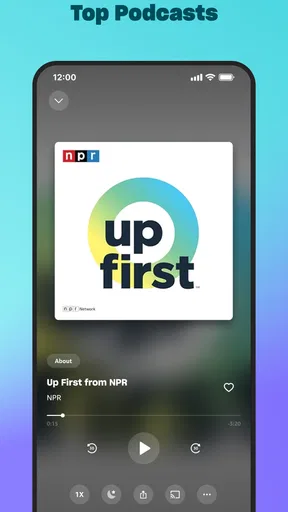
If you're a podcast junkie like me, you'll appreciate the vast selection available here. From true crime to comedy, there's something for everyone. The app makes it easy to follow your favorite shows and get notified about new episodes. Plus, the ability to download episodes for offline listening is a lifesaver for those long commutes or flights where Wi-Fi is more of a dream than a reality.
Downloads are especially useful when I know in advance that connectivity may be unreliable. I would queue an episode before leaving home rather than assume a station, airport, or train will provide a stable connection. That small habit makes offline listening feel dependable. It is also worth thinking about what you download: a few planned episodes are easier to manage than saving everything automatically and then discovering that the device has less room for other things.
Following a show works well if I listen to it regularly, but notifications are not always welcome during a busy day. I prefer to treat them as a reminder to check in, not an instruction to stop what I am doing. For a commute, I can follow a series and save an episode for the ride; for short errands, music is less demanding and easier to pause. This makes the app flexible, but listeners who want detailed episode research, transcripts, or production controls should look for a dedicated podcast or creator tool that explicitly offers those capabilities.
One question people often have is whether they can listen without a connection. The straightforward answer is that podcast episodes can be downloaded for offline listening, which is useful for planned trips. I would not assume every kind of content is available offline in the same way; I would check the individual item in the app before depending on it. For a long journey, preparing a small selection ahead of time is safer than waiting until the signal disappears.
Building a music session
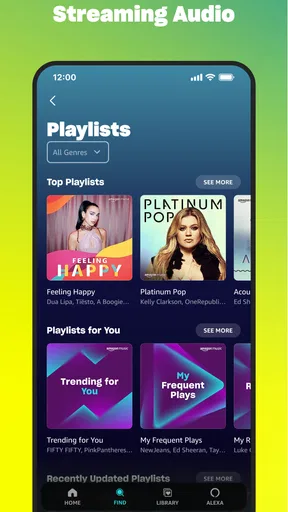
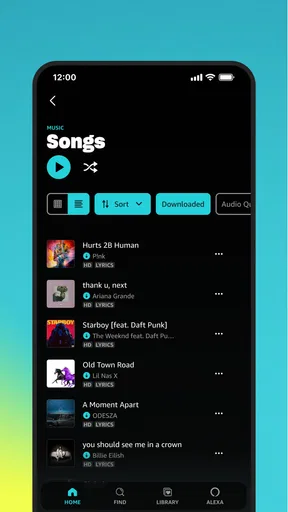
Let's talk about the music. Whether you're into pop, rock, jazz, or classical, Amazon Music has got you covered. The sound quality is top-notch, and with millions of songs at your fingertips, it’s like carrying a concert hall in your pocket. I love the fact that I can create my own playlists or dive into the ones curated by the app itself.
Playlists are where I see the clearest difference between a casual listening session and a more intentional one. A curated mix is quick when I only need background sound; a playlist I put together is more useful when I want a consistent pace, such as music for a workout or a familiar set for the drive home. Making that choice before pressing play saves me from repeatedly skipping tracks. It is a small workflow improvement, but it makes the app feel more suited to the moment.
Compared with the usual alternatives, the appeal here is the combination of songs and podcasts in one listening environment. A music-first service may feel more focused if all I want is to explore artists and albums, while a podcast-focused app may offer a more specialized way to organize spoken shows. I would choose this app when I value having both formats together; I would choose a dedicated alternative when its particular discovery, organization, or creator features matter more than that convenience.
For a shared household or a day that moves between different activities, keeping music and talk in one app can reduce friction. It does not mean every recommendation will match every listener, so I would still search for a specific album or show when I know what I want. The useful trade-off is clear: convenience and variety on one side, less specialization than an app built around only one kind of audio on the other.
Listening, lyrics, and small choices
One of my favorite features is the ability to view lyrics in real-time. It’s perfect for when you want to sing along or just understand the meaning behind the songs. It’s these little touches that make the app feel more personalized and engaging.
Lyrics are a nice extra when I am listening actively, but they are not the reason I would choose a music service on their own. I find them most useful when a song is unfamiliar or when I want to sing along; for background listening, I rarely need to keep the screen open. This is a good example of the app serving both casual and attentive use without changing its basic purpose.
If I am using music to focus, I choose a familiar playlist rather than spending the whole session browsing. If I am trying to discover something new, I give recommendations a short chance and then save the tracks or artists that genuinely appeal to me. This keeps exploration from becoming a distraction. The app can help surface options, but my own choices still shape a useful listening routine.
Someone comparing services may also wonder whether free access is enough. The app is free to download, but paid in-app options are available, so I would decide based on the listening access and features offered in the current plan rather than assume every part of the experience is included at no cost. If you only want occasional listening, starting free is a sensible way to see whether the interface and discovery style suit you. If you depend on a particular feature, confirm its terms before building your routine around it.
Where it fits—and where it doesn’t
The strongest fit is for someone who listens to both music and podcasts and wants an easy way to move between them. It also suits people who like using playlists as a quick backdrop and occasionally want recommendations to widen their listening. A commuter can follow a show and download episodes before travelling, while someone at home can use music for chores and switch to a podcast during a break.
I would skip it if I wanted to create or edit audio, publish a show, or manage creative files from an initial idea through delivery. Nothing about its role as a listening app makes it a substitute for recording software or a publishing platform. I would also consider a specialized music or podcast service if I care more about that one format than about keeping both together. The better choice depends on whether breadth or a more focused workflow matters most.
Another sensible expectation is that recommendations are helpful but not infallible. A suggested playlist can be a good way into a mood, yet a listener with precise preferences may find direct searching more reliable. I would not judge the whole service by a single mismatched suggestion; I would use recommendations for exploration and my own playlists for repeatable sessions. That balance is more practical than expecting an algorithm to understand every context.
For a normal day, I might start with a familiar playlist while making breakfast, download a podcast episode before leaving, and use that episode on the commute. Later, I can return to music without opening a different app. The useful detail is to prepare the offline episode before the trip and choose the playlist before a task begins. Those two decisions reduce interruptions more than endlessly browsing once I am already on the move.
A listening companion, not a production suite
So, would I recommend Amazon Music: Songs & Podcasts? Absolutely! It’s a versatile app that caters to both music lovers and podcast enthusiasts. The user-friendly interface, combined with an extensive library of content, makes it a must-have for anyone looking to enhance their audio experience.
I would phrase that recommendation with one condition: it is strongest when you want convenient listening across music and spoken shows, not when you need specialist tools or complete control over every listening choice. Its mix of playlists, recommendations, followed shows, downloads, and lyrics gives me several ways to use it without making the experience feel like a production task. That is a useful everyday strength, even if it will not replace a dedicated app for every listener.
If you haven’t tried it yet, you might be missing out on discovering your next favorite song or show. Give it a go, and let the tunes and talks transform your daily routine!
Pros
- Extensive music library with diverse genres.
- Offline listening for premium users.
- High-quality audio streaming available.
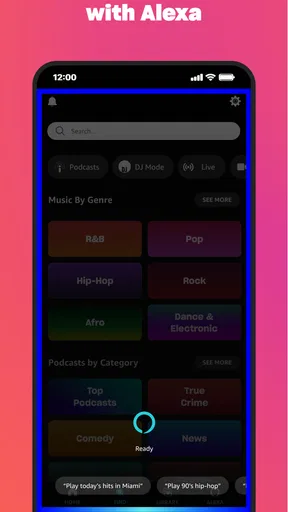
- Seamless integration with Alexa devices.
- Personalized playlists and recommendations.
Cons
- Limited features in the free version.
- Ad interruptions in free tier.
- No lyrics feature for some songs.
- Occasional app performance issues.
- Region-specific content limitations.
FAQs for Amazon Music: Songs & Podcasts
What platforms does Amazon Music: Songs & Podcasts support?
Amazon Music is available on a variety of platforms, including Android and iOS devices. You can also access it on desktop computers through a web browser, as well as Amazon's Echo and Fire devices. This broad compatibility ensures that you can enjoy your music and podcasts seamlessly across different devices.
Is there a free version of Amazon Music?
Yes, Amazon Music offers a free version with ads. However, for an ad-free experience and additional features such as offline listening, higher audio quality, and access to a larger music library, you might want to consider Amazon Music Unlimited or Amazon Prime Music, both of which require a subscription.
Can I download music for offline listening on Amazon Music?
With a subscription to Amazon Music Unlimited or Amazon Prime Music, you can download songs, albums, and playlists for offline listening. This feature is particularly useful when you’re in places with no internet connection, like while traveling or in remote areas, ensuring uninterrupted access to your favorite tunes.
Does Amazon Music offer podcasts?
Yes, Amazon Music includes a wide variety of podcasts across genres such as news, comedy, and true crime. The app provides a user-friendly interface to browse and listen to podcasts, making it a convenient platform for both music and podcast enthusiasts. You can stream or download episodes for offline listening.
How does Amazon Music compare to other streaming services?
Amazon Music offers a competitive range of features, including an extensive library, high-quality audio, and seamless integration with Alexa. While it shares similarities with services like Spotify and Apple Music, Amazon Music stands out with its exclusive content and benefits for Amazon Prime members, making it a strong contender in the streaming market.


